Sunday, 1 July 2018

ISTE 2018 - Learn to create some pretty sweet graphics

Presenter: Manuel Harrera


This was another session that Kiri and I attended together. The most valuable part of choosing to do sessions together was the follow up conversations we had immediately after relating to how we can use the learning with our own students. We have many students this year who are highly skilled graphic artists and I am very much looking forward to sharing my learning from this session with them. Below are my notes.


  • Creativity is a process - not just choosing the go to app (ref to slide 2)
  • Sketch to visualise thinking - communicate without speaking to each other
  • Adobe capture in iPad saves your data
  • Canvas slide - saves colour pallet - has image sizes
  • Insert word art allows for automatic resize of text
  • Google search font pairings
  • Vector art can be scaled from any size - doesn’t blur or pixelate
  • Use Instagram template to create bio for historical leader etc
  • Use polyline in google draw to create shape for vector art
  • Remove outline - colour fill - send to back
  • Repeat process for each shape - layer
  • Innovation Exchange 
  • Change canvas using pixel measurements
  • Add graphics
  • File - download png
  • If wanting sticker cld send design to sticker mule
  • App design storyboard 
  • All drawings are done in slides too
  • Gif animation - draw peanut jar - find png arms on image search - upload each movement snapshot to google photos - assistant in google photos creates animation gif
  • Sound = shrink YouTube clip down to smallest size to hide but can hear

ISTE 2018 - Arts and Technology PLN Breakfast Walk

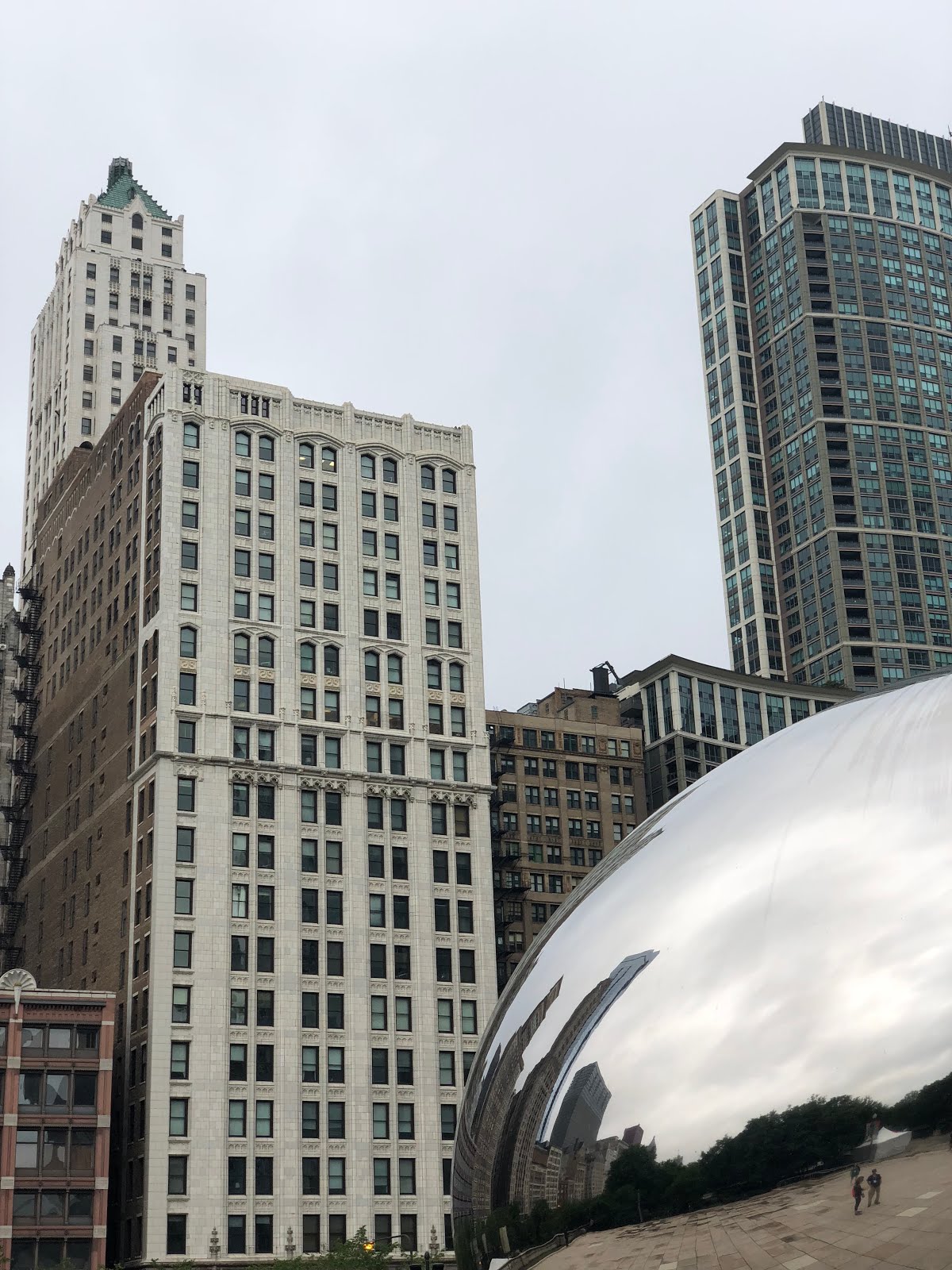
This was one of my favourite sessions and completely worth getting up at 5am for. Kiri and I met the rest of the group at Cloud Gate, otherwise known as 'The Bean'. The purpose of this session was to connect with other educators, learn a few photography tricks and we explore some of the iconic sites around Millennium Park. Below are some of the images I took during this session.


Group photo 


Photo taken by Kiri


My takeaways:
  • Use the panoramic setting to capture tall buildings - remember to scroll slowly until you get a square on the screen
  • App snapseed - use the 'drama' setting
  • Turn phone sideways so volume buttons are on top righthand side to use these as the camera shutter button
  • Tap the screen to focus on one area
  • Remember rule of thirds and use gridlines


ISTE 2018 - Visualise. Connect. Doodle. Repeat... Sketch noting to enhance learning with EE

Presenters: Baughcum and Dana Ladenburger

Visual note taking (also known as sketchnoting) is a note-taking strategy that connects visuals with words to help improve our ability to synthesize, retain, attend to comprehend and recall information while strengthening our metacognition. While current research is changing how educators view doodling, visual note taking and how they can be used in the classroom, it does shows us the use of graphic/ visual notes can improve retention, learning and so much more. Best practices within visual note-taking are evolving rapidly. This interactive session will have educators doodling to learn, taking their thinking visual and making notes digital. Participants will learn the parts of sketchnoting and the variety of ways each parts unique strengths can enhance the learning of all students, while also experiencing a variety of different ways you can use sketchnoting’s components combined with Explain Everything’s elements to make visual note taking and learning reflective, visual, shareable, collaborative and interactive.


Kiri and I attended this session together so that we could use the tools we have available in our learning space to help our learners create a sketchnote to help them summarise new ideas and make notes when researching. This was a fantastic hands on session and one we have already volunteered to take a toolkit on in term 3.

Sketchnote a journey through time or make notes to help students improve and recall
main ideas.
Typography - font used to identify main ideas or important places, dates, people
Icons -
T can create an icon library that stdnts can become confident using - when confident cld be collaboratively created by stdnts
New idea = new slide
Connectors - Arrows - lines - dashes = connect info and solidify relationships and u/st
Containers - Hold info - thought bubbles, speech bubble, shapes = organise similar ideas and thoughts linked to topic - quotes, contributions, ideas
Container library so that each shape holds specific info and can be transferred across subjects
Structure and colour - Way you format page - idea in one position and containers, fonts etc show progression - linear v abstract using colour coding and anchoring

Input a google doc and/or image so students can sketchnote over and in context
How to bring all together using EE - New slide - title sketchnoting - group using i icon - copy - paste on main note - export to drive and post


Kiri's example of using EE to create a sketchnote

ISTE 2018 - Keynote 2

Andy Weir
Science fiction author: The Martian and Artemis

Creativity in science can be explored in literacy - STEM Read
Boredom leads to disruption - problem solving by finding the how to can provide the level of challenge and the process of learning - research + find solutions - driven by curiosity to find many possibilties
Failure based learning is flipped to embrace failure by finding the solutions
In writing need to know how to structure and write in the genre - eg problem + solution cycle in writing helps hook the audience in
Create Ebook to grow global audience - can put on on AMAZON


Katie Martin

Build T pd from stdnt interest to evoke curiosity rather than just complying - transform learning thru design and creativity as this hooks the T in to and the passion is shared. Empower ones to embrace their passions not just what they are told to learn - know your learner. Digital citizenship prepares students for now not for tomorrow - the Internet is their now!


Luis Perez: TED X


Visual impairment means he lives between the sighted and non sighted world - mixed culture - Spanish in an English world
all values need to be incorporated into education so stdnts don’t have to live between worlds
Alex - synthesised voice (assistive technology) gave hope as the barriers were removed - seeing positivity (eg Luis choosing to learn photography despite visual impairment) ‘ The photos are for the viewer the event of photography is for me’ - photography makes me visible and helps others address their preconceived thoughts and ideas
Technology makes things possible - eg Ebook text can be enlarged etc and/or read to you - allows everyone to access the learning - humanity allows for those with different backgrounds can be empowered to be the best you can be
T should be the start - light the path and given he stdnts the tools they need to turn the lights in in their own paths

ISTE 2018 - Beyond the fourth wall - one school districts quest to make thinking visible


Lake Zurich Community Unit District 95 is following a pathway similar to our Manaiakalani ethos and COL practises. This panel of teachers spoke to a series of predetermined questions that told the story of their shared learning journey. Throughout the session they used menti.com to allow real time audience participation. I really enjoyed listening to these teachers as their passion was evident and their experiences real. Below are my notes from this session.

What is visible learning and why does visible learning matter?

  • What students know v don’t know - inquiry conceptions v misconceptions - ref to TED x Luis photographic process v actual pic we see. Students and T u/st what they need to learn and where the gaps are - current fb to engage and forge connections - often students tell us what we want to hear but T can use technology and instructional strategies to explore beyond this - need to remember to get students to explain their thinking... it matters because it allows for self reflection from students that is then developed by T fb - use eg of clapping to show u/st - T claps student's grade but T doesn’t know why or how she got these marks - Fb needs to remind how success can be achieved but need to give choice options - Children need to know how to learn and how to receive fb so that they accept it as a growth opportunity - visible means knowing where u r on your learning journey and T know how to keep this journey going


How have administrators and coaches helped teachers develop a common language and practices around visible learning?

  • Where am I now? 
  • Where am I going? 
  • How can I close the gap? - shared language of instruction so T have vocab to talk about their practise cluster wide - cornerstone of learning T tell students what they are learning and how they can achieve it LI/Sc - look for questioning and fb with students eg to corroborate - Hatties research of Teacher Efficacy 
How have visible learning strategies made a difference for students?

  • Students use the same shared language... Where am I now? .... Where am I going? ... How can I close the gap? to talk about their learning. Effective as all students understand what this means - Remind students about the power behind words
What are some examples of successfully paired visible learning and technology?

  • iPads - digital discussions eg: menti to ask qu - embrace failure - stdnt fb on app choice - keynote - president - slides - green screen - stop motion... look up torn paper version. SAMR - G suite - seesaw (annotate pics/selfie video) - flipgrid - talk ideas - canva - twitter type info bytes will see what main ideas are being internalised - Storify - post it plus - clips

How do we know our interventions have been successful?

  • Efficacy and ownership of learning and gaps in learning - be able to communicate this to others - create to show u/st
My takeaways:
  • Use menti.com as a way of encouraging student questioning as it removes the fear that often comes from our struggling learners when they are asked to ask questions
  • Introduce the app 'post it plus' to LS2
  • Build on the global connection I made so that LS2 have American blogging buddies and their Y7/8 class have NZ blogging buddies

ISTE 2018 - Poster Sessions

Running throughout the ISTE timetable were poster sessions where teachers shared successful classroom practise. The 2017 COL teachers followed a similar format last year at the Manaiakalani Hui. These were really interesting as you had the opportunity to speak 1:1 to the presenters who were all very keen to share. I found these sessions informative and personal as you were able to ask questions and make connections.


My takeaways for giving a poster presentation:

  • Have large visible QR codes that link to your presentation and resources (many people used these so they were able to follow up in their own time)
  • Have a large visible QR code that links to your contact details (this allows for ongoing connections to be made). One group had these on the backs of their tshirts - what a great idea!
  • If possible use student voice as this was really powerful.

Sessions I went to:

ISTE 2018 - Fake news media bias and misinformation - fostering digital literacy and media fluency

Presenters: Amy Blades and Carie Hinkle

Fake news, media bias and misinformation are overwhelming topics everyone must learn to navigate. The prevalence of misinformation in our daily lives makes a strong case for the urgent development of digital literacy and media fluency. In this session, you will participate in a gamified learning experience designed to foster the development of digital literacy and media fluency skills in the classroom. Add practical resources and tips to your repertoire to support students with critical analysis of digital information and media. This session is interactive, so bring your device to participate. The purpose of this session is to support educators in enhancing their repertoire of practical resources and tips to foster an increased awareness of the need for digital literacy and media fluency as necessary life skills. Through the use of gaming in the classroom, educators have the opportunity to support student choice and voice to enhance personalized learning practices.

Kiri and I both attended this session as we share a class and wanted to ensure we were giving a shared message with a shared language of instruction. Our takeaways from this session were that we already have a clear understanding of the importance of making our students aware of the need to be able to identify fake information. This is something we actively build into our teaching program and look forward to being able to enhance our current activities with the new resources we learnt about in this session.


My initial u/st - Fake news is news that provides misinformation
Consumers need to be critical judges of content
How might educators foster an environment of critical consumers in a sea of media?


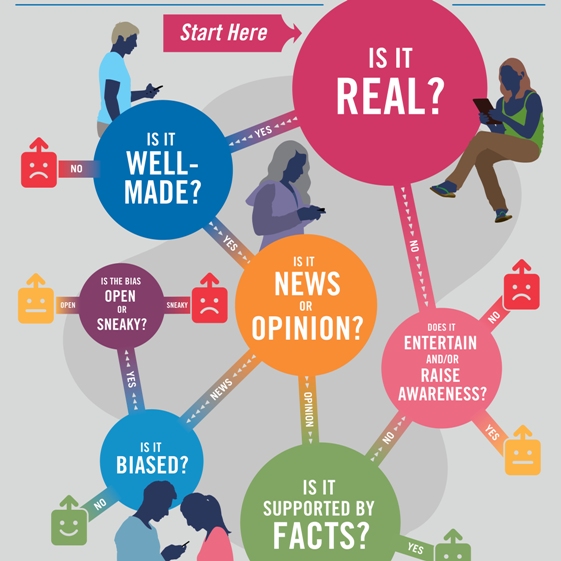
% of time that fake news is not identified is huge - show egs. Use audience participation to gauge fake or real opinion from class. Examples on presentation resource.

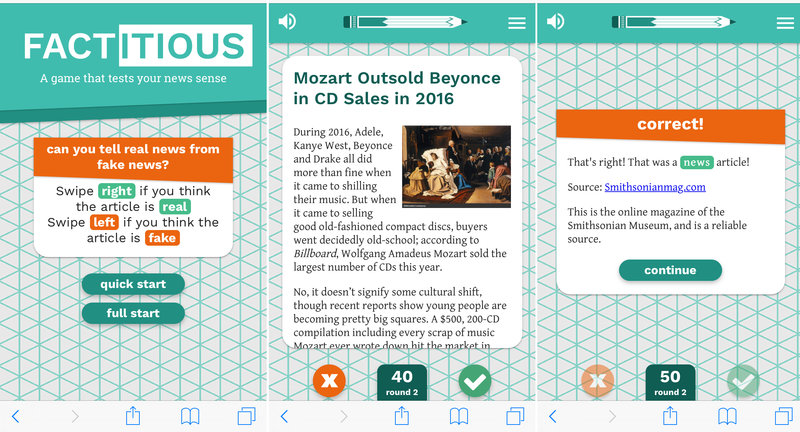
Link to facticious site - multimodal examples


Satirical fake news - insert slides here that have egs on them
Click bait - draws the reader in for financial gain - use google images as examples
Partisan bias - used to promote a response
Fabricated - to mislead the reader


T. Need to encourage students to dissect the URL then research the domain... Whois.net to help make critical decisions


- use reverse image search to check authenticity - right click to search in chrome
- Check bio on social media sites to verify accounts


Useful links: