Showing posts with label empowered. Show all posts

Friday, 9 August 2019

Digital Fluency Intensive... Day # 8

Cybersmart not Cybersafety!

Empowering our learners as connected and confident decision makers. All our students have had Internet in their lives since birth so they are at home in a digital world and if not we need to make sure they are. By promoting the positive, Cybersmart becomes the fence at the top and not the ambulance at the bottom.


How we implement Cybersmart:
  • Cybersmart training is a whole school focus
  • Planned and deliberate teaching, relevant and real scenarios as part of the existing programme of learning.
  • Term 1 Smart learners (LEARN) - are our stdnts effective and prepared users of digital
  • Term 2: Digital footprint (CREATE) - understanding what info we should share and what we should keep to ourselves - making these decisions is important
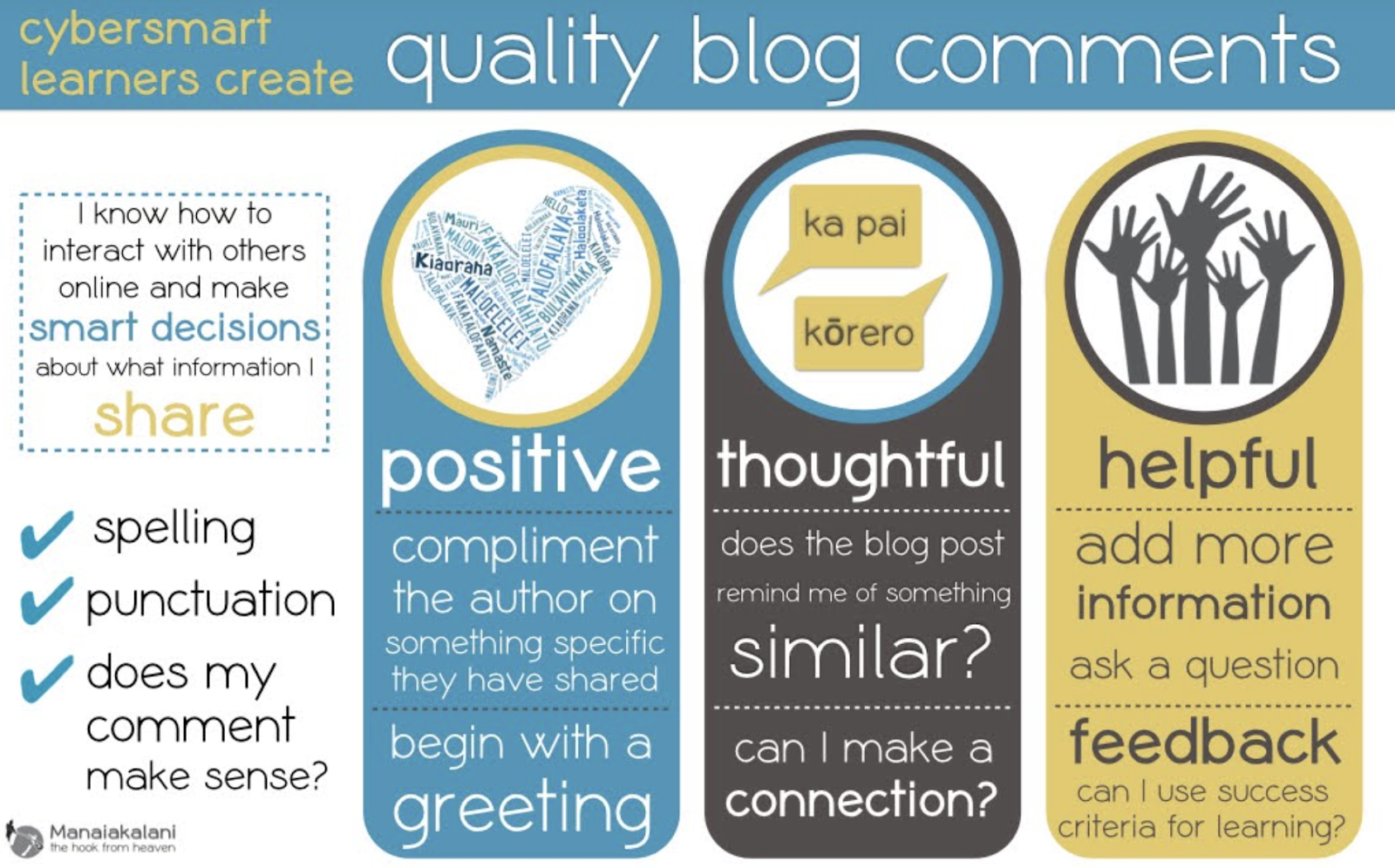
  • Term 3 Smart relationships (SHARE) - how we comment effectively on blogs, how can we invite an audience to engage with us - how to we equip our learners to be capable and positive contributors to a global society
  • Empowering confident connected actively involved lifelong learners
  • Ubiquitous when learning is accessible A4 (anyone, anywhere, any time any place)
  • Connected empower our young people to engage online behaviour and thinking that elevates positive actions (eg: Tuhi Mai Tuhi Atu as Blogger allows us to take our students online in a safe environment as we can monitor the content and comments)
  • Kawa of Care - empowers parents and caregivers to confidently connect with their children’s learning
  • Cybersmart allows for increased opportunities for learners to engage in cybersmart conversations and decision making with peers, whanau and teachers.
Hapara
  • Dashboard helps make learning visible
  • Enables quick access to student work
  • All Classes - enables access to all school drives
  • Work must be in folders to be visible - open XXX folder then create a doc avoids trying to access unshared work
  • Drag whole Screencastify folder into media folder so its visible to teacher
  • Set up groups on my dashboard won’t affect a co-teacher
  • Reset folders: Will reinstate ‘lost folders’

Manaiakalani 1:1 Journey
Partnership
  • Ako is a whānau or community experience - learning from and with each other
  • Engagement in the decision making eg Kawa of Care
  • Engagement through device ownership
Participation
  • Every learner can participate
  • Every teacher can be supported to become Digitally Fluent when all devices are the same
  • Engagement through device ownership
Protection
  • This should all happen behind the scenes
  • Manaiakalani partnered with Hapara to design Teacher Dashboard to make all digital learning visible
  • Partnership with N4L and Linewize for filtering

Equity and Access - Providing the very best device for learning for EVERY young person
Digital Fluency starts with the ability to use the device (Learners, Teachers, Whānau)
Teachers in a 1:1 Class need to use a learner Chromebook for a period of time to understand what the kids can (and can’t do). Today we used Chromebooks to access our learning the way our students access their learning. It was a real eye opener as this was my first time to purposely use a Chromebook. Completing the digital dig was a great way to familiarise us with what we ask our students to do every day. I know understand why some of my learners choose to use a mouse. The mouse pad would take a bit of getting used to as it didn’t respond the way I wanted it to. 

The Digital Dig should be included at the beginning of EVERY year at EVERY level.


iPads

  • Ipads.manaiakalani.org - explicit site for iPad teachers
  • Best practise is to cast onto an apple tv when using the iPad as a teaching tool
  • Need to start by teaching the correct vocabulary as this is often transferable across the tools
  • We explored Explain Everything (the main platform the junior school uses) which highlighted the fact It is important for Chromebook teachers to realise and remember that students who have been through their junior school learning journey using iPads come with a large kete of digital skills.

Friday, 2 August 2019

Digital Fluency Intensive... Day # 7

Empowerment is dependent on the interconnectedness of our kaupapa (connected, ubiquitous, empowered, visible). Our tamariki start school at 5 years of age having heard 32 million less words than higher decile communities. Encouraging 5+ a day 'ping pong' style conversations is one way we can help our learners increase their oral language levels. The default of visible empowers our tamariki and is vital for connections to be made both before and after the learning.

‘The Manaiakalani kaupapa of empowerment is the advancing of Rangatiratanga; taking back control of their own lives.’ - Pat Sneddon


Computational Thinking

How a computer thinks, algorithms, programming, algorithmic thinking skills (logical thinking). To introduce us to this session lead by Viv, we were given the challenge of working out who was born closest to Auckland using an algorithm layout on floor. Our aim was to move from box to box following arrows according to a given criteria. This was not only a lot of fun but also allowed me to make solid visual connections to the learning ahead.


Ethics and Morals 

We can all gather data but need to think and make choices about what we do with this information. To explain this further we were asked a series of questions linked to different scenarios that really tested our own ethics and morals. The link to the our questions is here.

Curriculum Deep Dive

The Digital Curriculum is about using technology ‘in authentic contexts and taking into account end-users’. Digital fluency is inquiry and communication - using technologies that already exist to learn-create-share (eg: adding a filter on Instagram). Digital Technologies is construction and expression to create something with technology (eg: can make a filter for a photo using software). 

  • Inquiry includes data modelling, spreadsheets, access to online databases, searching, access to virtual labs, online observatories, virtual field trips
  • Communication includes word processing, e-mail, virtual conferences, graphics software, blogging, vlogging, presentations, websites and tutorials
  • Construction includes robotics, computer-aided design, control systems, programming, electronics, digital manufacturing, game design and sensors.
  • Expression includes interactive video, animation software, 3D design, music composition, digital art, digital story telling


Practical Application 

We explored several sites that uses blockly (a programming language that clicks together) to practise our own computational thinking skills. This is definitely an area that is still a work in progress for me so I really appreciated the opportunities to ask questions and have a go.

Hour of Code (Thanks for inspiring me to get my certificate too Angela)

Binary

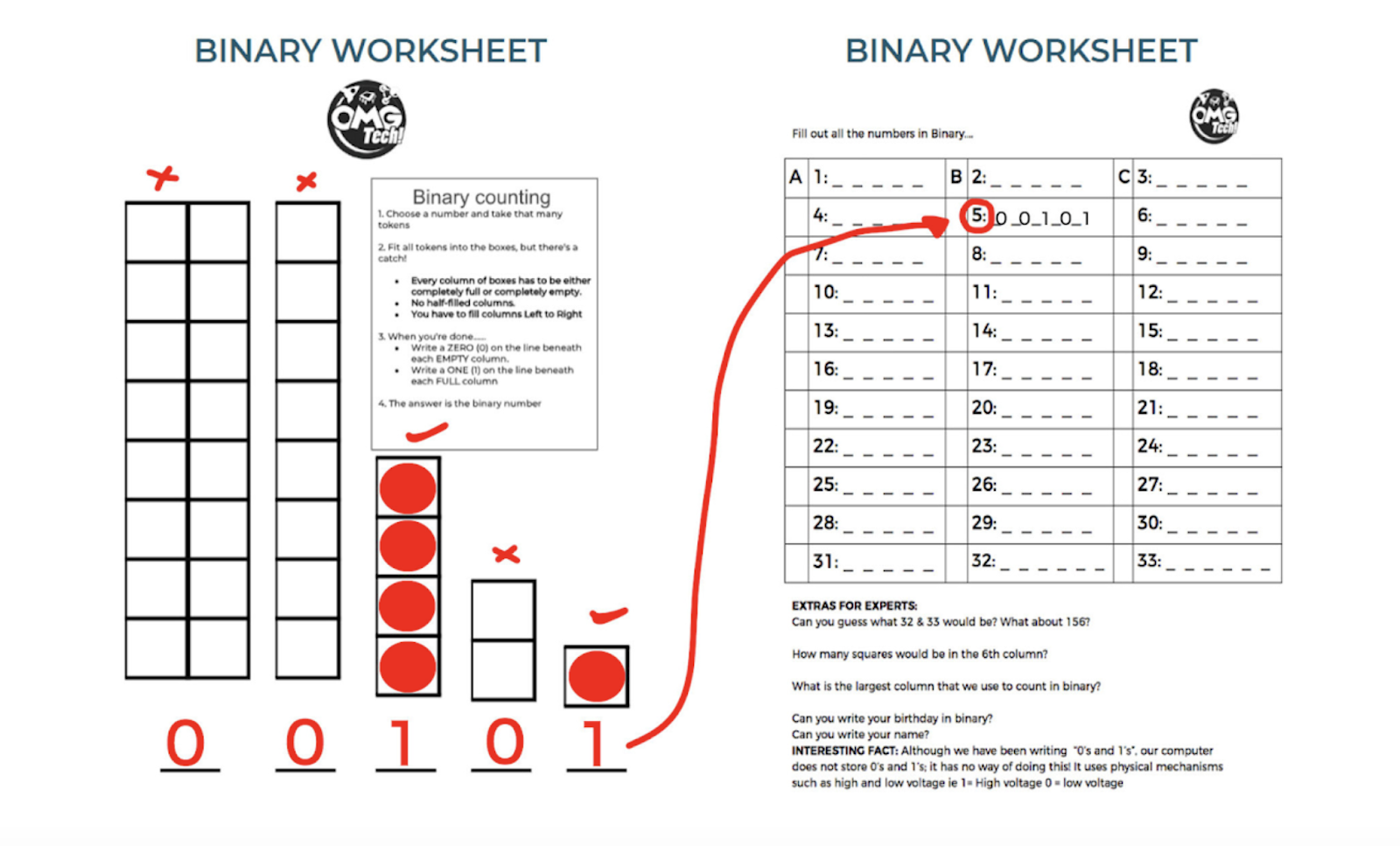
Learning about binary numbers was a really valuable part of today's learning for me as it filled another one of my own knowledge gaps. Binary is a number system that uses 1 and 0. I have seen other teachers use binary challenges with their students but I have never done that myself as I did not have the content knowledge. However after completing todays challenge I will definitely be adding this to my planning. The Khan Academy  has a video that explains binary. The image below can be sourced here  and is a challenge that was a lot of fun to do.


Useful Takeaways:

  • An algorithm is a set of instructions.
  • Mapping the algorithm pathway on the floor is a great visual connection and scaffold
  • Debugging and error detection introduce the problem solving components
  • Coding is not scary 
  • Binary is fun!
  • I will be adding some of today's content to my planning.

Wednesday, 31 August 2016

Setting ourselves up for success is a step by step process...

Making connections with the learning is the key to genuinely deepening understanding. By tapping into the knowledge gained across multiple learning areas we can encourage our learners to merge these various knowledge bites of independent information. Our task today was to do exactly that. Earlier in the year we explored the ways personification and the 5 senses can help us see things from a different perspective (-the original task link is on slide 2 of the teaching DLO below). This term our inquiry focus has been Olympic based. Over the last five weeks we have looked closely at how elements of Hauora, Diet and Training can affect an athlete's performance. By viewing the 2016 Olympic games through the eyes of an athlete standing on the medal dias, I hoped that my learner's would make stronger and deeper connections to our topic.

The images below show the process we went through to help us retell an event through someone else's eyes.


Merging images to make personal connections had everyone hooked. As a class that lives and breathes the ethos of collaboration, I noticed at least half of my learners chose to 'stand on the podium' with a buddy. Another interesting observation is that the colour of the medal was invisible. National and personal pride completely overshadowed the gold, silver, bronze hues.


With the imaginary eyes of the world on us we now needed to fill our knowledge 'ketes'. After all you can't describe something you have never seen if you don't have the tools to grow and foster an imagination. Our tool for this was 'Sketchnote'. I had read Karen Ferguson's post about her own experience of picking out the main ideas and focusing on them by 'sketchnoting', and decided to afford my learners the same opportunity. The image below reflects the way one of my learners added to her own 'kete' using this method. 


Sketchnoting allows us to record information using our own words or pictures. This learning tool is helping my learners make notes that make sense to them rather than simply copying what someone else has written in their own handwriting. Being able to retell their very personal 'sketchnote' stories to a friend underpinned the understanding and allowed those strong connections to be made.

Where did this information come from? The answer, multiple sources. I provided links to online newspaper articles and challenged my learners to use their smart searching skills to find supporting information that they read, watched and listened to. It is very rewarding to watch the seamless interchanging of their subject specific 'thinking hats' as knowledge gained during these lessons was synthesised and recalled to meet the learning needs of this lesson. 

Being given the choice of selecting the way they want to approach the 'create' aspect of this learning has both engaged and empowered my learners. Some chose to show their understanding through interviews or conversations using ifaketext.com; others have opted to write narratives; one learner has decided to write an email home to their family and two groups are in the beginning stages of storyboarding their movies. 

Were connections made today? The simple answer is yes!