This afternoon we held our first digital SLAM in LS2. This was an opportunity for our students to share a Chromebook tip with each other in a fast paced an energetic way. These are not our original tips but are shortcuts we find useful in our 1:1 digital classroom.
Showing posts with label Cybersmart. Show all posts
Showing posts with label Cybersmart. Show all posts
Tuesday, 27 September 2022

Saturday, 25 April 2020
Cybersmart Observation...
Edit: This observation took place in February 2020
Over the summer period my class took part in the Summer Learning Journey. As a school we did extremely well as far as participation and output, but dropped the ball as far as commenting was concerned. Our students actively commented on the blogs of other participants but did not comment in a way that created a thread of comments. I didn't know how to strengthen this understanding so I asked Heather Collins, one of our Manaiakalani facilitators to model a Cybersmart lesson for me. We have access to a wealth of Cybersmart resources but as someone who has been a part of Manaiakalani from the beginning I have not had the opportunity to observe one of these lessons first hand.
Here are the notes I took:

Over the summer period my class took part in the Summer Learning Journey. As a school we did extremely well as far as participation and output, but dropped the ball as far as commenting was concerned. Our students actively commented on the blogs of other participants but did not comment in a way that created a thread of comments. I didn't know how to strengthen this understanding so I asked Heather Collins, one of our Manaiakalani facilitators to model a Cybersmart lesson for me. We have access to a wealth of Cybersmart resources but as someone who has been a part of Manaiakalani from the beginning I have not had the opportunity to observe one of these lessons first hand.
Here are the notes I took:
- Begin by stating the purpose of the lesson (- this linked to the reasons I have mentioned above)
- State the Learning Intention - LI: To create a thread of comments

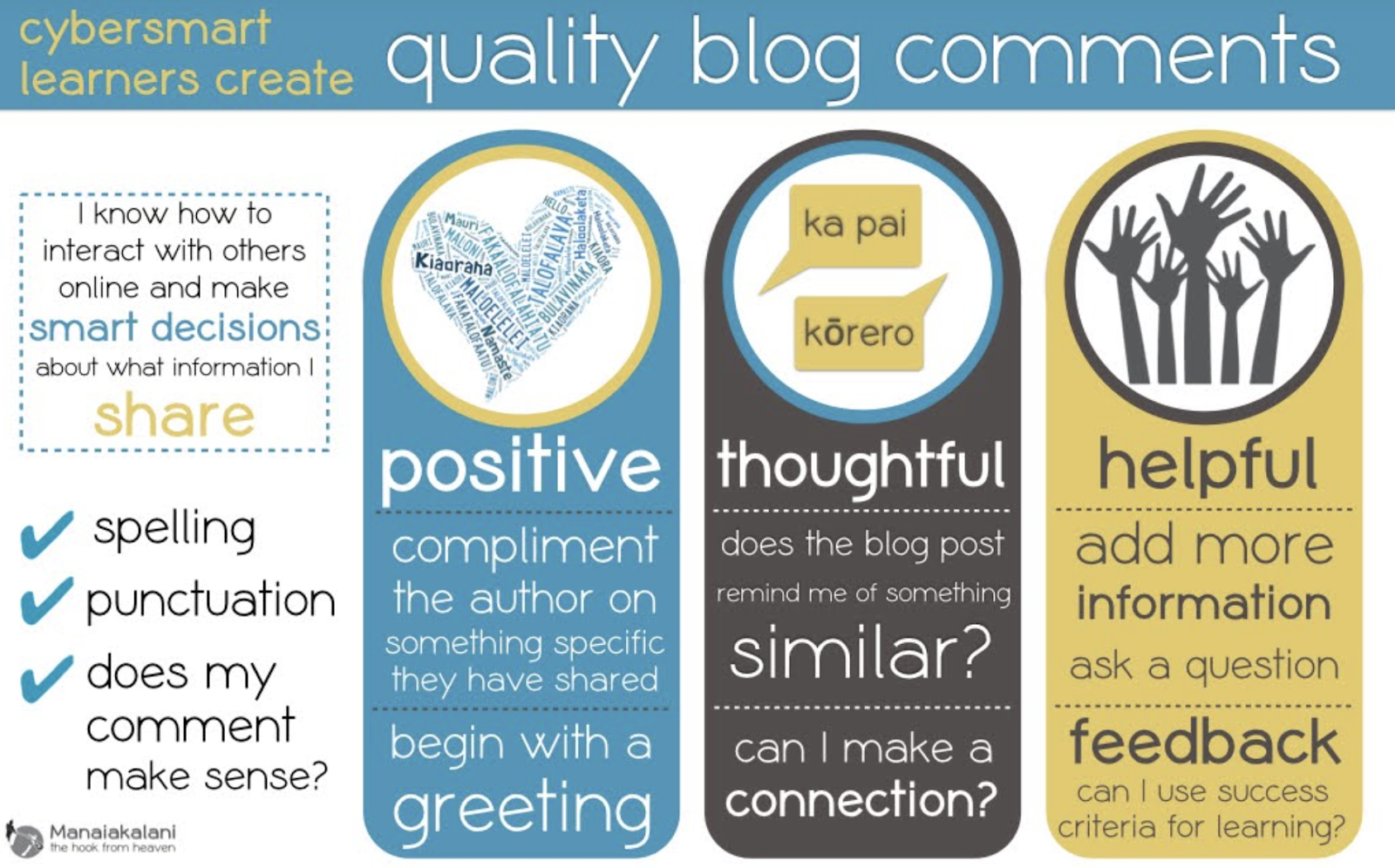
- Display the 'Quality Blog Comments Poster' and unpack
- Ask students to generate sentence starters for 'compliments'
- Model how to write a quality blog comment using a student blog post (promotes a connection)
- Explain that a question has been asked so now needs a reply.
- Ask: How might you reply to this comment?
- Co-construct a reply
Where to next:
- Actively plan time for students to comment on blogs and respond to comments on their own blogs.
- Revisit the Manaiakalani cybersmart lessons to access the resources available. The shared language of instruction will help my learners to continue to build on and strengthen the knowledge they have, and will scaffold and support my students new to Manaiakalani this year.
- Make a display that reflects our unpacking and understanding of how to write a quality blog comment - make it visible - keep it visible.
Wednesday, 18 March 2020
TAI 2020 WFRC Question #2...
#2... Collaborate with your senior leadership team and colleagues to identify areas where your inquiry will make a powerful contribution to wider school and cluster goals.
For the last 5 years Panmure Bridge School has claimed the Summer Learning Journey's overall prize for top blogging school, something we are extremely proud of and value highly. The Summer Learning Journey (SLJ) is a blogging challenge that runs over the summer holidays. This programme 'was created in response to concerns about the annual drop, slide or slump in literacy achievement experienced by students in New Zealand schools' and encourages our students to use their literacy skills which helps set them up for success and by maintaining the gains made over the school year.
The feedback from the SLJ team was that our participants had strengths in blogging, however, seemed to drop the ball when it came to the commenting component. Many of our learners either overlooked responding to comments made on their blogs, or simply replied with a thank you. Why did this happen? Not because our students were 'lazy' but possibly because as teachers, we had not set them up for success in this area. With that thought in mind I want to build on the learning from my 2019 inquiry and align our school-wide professional development focus of maths to find out if strengthening connections to Smart Relationships will help our tamariki to understand and use maths language and vocabulary in context?
Over the next few weeks I will be working alongside all our teachers to help them create their own backwards maps. This tool helps individual teachers to narrow the inquiry pathway they wish to travel along and they personalise their connections to our wider shared focus.
After speaking with Hannah West, who kindly shared the blogging rubric she created for her learners last year, my plan is to work with our PBS team to co-construct a rubric that is personalised to our school. This will allow our learners to see where they have met the success criteria and what it is they need to do to move their own learning to the next level. By creating a rubric specific to the shared language of Panmure Bridge School, our teachers and students will have ownership of the tool that will allow us to measure student progress, and help our tamariki see that learning linked to vocabulary, instruction and strategy used in one area can be transferred to another.
In class we actively plan for, and teach our students how to participate actively in a dialogic learning discussion. They are skilled in this area when asked to do this in class, but as yet most of our students are not carrying this thinking through to their blog commenting. In addition to actively planning time to allow our students to use maths language and vocabulary in context a number of our teachers are participating in the Tuhi Mai Tuhi Atu ('Write to me, Write to others') programme. Tuhi Mai Tuhi Atu helps connect learners across the Manaiakalani and outreach clusters through blog commenting and will help provide authentic opportunities for learning conversations to take place under the cybersmart umbrella.
The feedback from the SLJ team was that our participants had strengths in blogging, however, seemed to drop the ball when it came to the commenting component. Many of our learners either overlooked responding to comments made on their blogs, or simply replied with a thank you. Why did this happen? Not because our students were 'lazy' but possibly because as teachers, we had not set them up for success in this area. With that thought in mind I want to build on the learning from my 2019 inquiry and align our school-wide professional development focus of maths to find out if strengthening connections to Smart Relationships will help our tamariki to understand and use maths language and vocabulary in context?
Over the next few weeks I will be working alongside all our teachers to help them create their own backwards maps. This tool helps individual teachers to narrow the inquiry pathway they wish to travel along and they personalise their connections to our wider shared focus.
After speaking with Hannah West, who kindly shared the blogging rubric she created for her learners last year, my plan is to work with our PBS team to co-construct a rubric that is personalised to our school. This will allow our learners to see where they have met the success criteria and what it is they need to do to move their own learning to the next level. By creating a rubric specific to the shared language of Panmure Bridge School, our teachers and students will have ownership of the tool that will allow us to measure student progress, and help our tamariki see that learning linked to vocabulary, instruction and strategy used in one area can be transferred to another.
In class we actively plan for, and teach our students how to participate actively in a dialogic learning discussion. They are skilled in this area when asked to do this in class, but as yet most of our students are not carrying this thinking through to their blog commenting. In addition to actively planning time to allow our students to use maths language and vocabulary in context a number of our teachers are participating in the Tuhi Mai Tuhi Atu ('Write to me, Write to others') programme. Tuhi Mai Tuhi Atu helps connect learners across the Manaiakalani and outreach clusters through blog commenting and will help provide authentic opportunities for learning conversations to take place under the cybersmart umbrella.
Sunday, 8 March 2020
TAI 2020 WFRC Question #1...
#1... Use the ‘inquiry stocktake’ doc to reflect on and write about what you aim to learn about inquiry this year.
This year my plan is to continue to keep a clear and detailed record of all stages of inquiry so that I am able to evaluate shifts in my own teaching and in student learning by monitoring (and tweaking) new approaches to the way I deliver the Manaiakalani Cybersmart programme. In the past I have found that using a backwards map is the best way to do this as it not only keeps me on track but also allows me to see the direction forward that I want to travel in.
During our last COL meeting we reflected on the aspects of an inquiry, what worked well, what challenges we faced and what support would be helpful. Doing this not only allowed us to tap into the successes of our colleagues but also allowed us to share challenges and reflect on areas we might benefit with additional support. I particularly liked the idea of having a central “bank” that we could all add to so we can see the breadth of reading being done and dip in. This would not only work well across our COL but as our school has a shared inquiry would definitely be something we would benefit from and should set up.
Last year after working with all our staff on their own teacher inquiries, I asked everyone to share the practices we want to carry forward. What emerged was a common thread. We all want students to see that learning used in one area can be transferred to another - linked to vocabulary, instruction and strategy. This shared understanding has helped guide our way forward and has determined our school’s focus for 2020. This year our 'umbrella focus' is to explore if 'strengthening connections to Smart Relationships help our tamariki to understand and use content specific language and vocabulary in context?' Having a broad shared focus allows us to not only learn with and from each other, but also allows us the freedom to add our own twist and try new ideas.
Friday, 9 August 2019
Digital Fluency Intensive... Day # 8
Cybersmart not Cybersafety!
Empowering our learners as connected and confident decision makers. All our students have had Internet in their lives since birth so they are at home in a digital world and if not we need to make sure they are. By promoting the positive, Cybersmart becomes the fence at the top and not the ambulance at the bottom.
iPads
Empowering our learners as connected and confident decision makers. All our students have had Internet in their lives since birth so they are at home in a digital world and if not we need to make sure they are. By promoting the positive, Cybersmart becomes the fence at the top and not the ambulance at the bottom.
How we implement Cybersmart:

- Cybersmart training is a whole school focus
- Planned and deliberate teaching, relevant and real scenarios as part of the existing programme of learning.
- Term 1 Smart learners (LEARN) - are our stdnts effective and prepared users of digital
- Term 2: Digital footprint (CREATE) - understanding what info we should share and what we should keep to ourselves - making these decisions is important
- Term 3 Smart relationships (SHARE) - how we comment effectively on blogs, how can we invite an audience to engage with us - how to we equip our learners to be capable and positive contributors to a global society
- Empowering confident connected actively involved lifelong learners
- Ubiquitous when learning is accessible A4 (anyone, anywhere, any time any place)
- Connected empower our young people to engage online behaviour and thinking that elevates positive actions (eg: Tuhi Mai Tuhi Atu as Blogger allows us to take our students online in a safe environment as we can monitor the content and comments)
- Kawa of Care - empowers parents and caregivers to confidently connect with their children’s learning
- Cybersmart allows for increased opportunities for learners to engage in cybersmart conversations and decision making with peers, whanau and teachers.
- Dashboard helps make learning visible
- Enables quick access to student work
- All Classes - enables access to all school drives
- Work must be in folders to be visible - open XXX folder then create a doc avoids trying to access unshared work
- Drag whole Screencastify folder into media folder so its visible to teacher
- Set up groups on my dashboard won’t affect a co-teacher
- Reset folders: Will reinstate ‘lost folders’


Manaiakalani 1:1 Journey
Partnership
Equity and Access - Providing the very best device for learning for EVERY young person
Digital Fluency starts with the ability to use the device (Learners, Teachers, Whānau)
Partnership
- Ako is a whānau or community experience - learning from and with each other
- Engagement in the decision making eg Kawa of Care
- Engagement through device ownership
- Every learner can participate
- Every teacher can be supported to become Digitally Fluent when all devices are the same
- Engagement through device ownership
- This should all happen behind the scenes
- Manaiakalani partnered with Hapara to design Teacher Dashboard to make all digital learning visible
- Partnership with N4L and Linewize for filtering
Equity and Access - Providing the very best device for learning for EVERY young person
Digital Fluency starts with the ability to use the device (Learners, Teachers, Whānau)
Teachers in a 1:1 Class need to use a learner Chromebook for a period of time to understand what the kids can (and can’t do). Today we used Chromebooks to access our learning the way our students access their learning. It was a real eye opener as this was my first time to purposely use a Chromebook. Completing the digital dig was a great way to familiarise us with what we ask our students to do every day. I know understand why some of my learners choose to use a mouse. The mouse pad would take a bit of getting used to as it didn’t respond the way I wanted it to.
The Digital Dig should be included at the beginning of EVERY year at EVERY level.
The Digital Dig should be included at the beginning of EVERY year at EVERY level.
iPads
- Ipads.manaiakalani.org - explicit site for iPad teachers
- Best practise is to cast onto an apple tv when using the iPad as a teaching tool
- Need to start by teaching the correct vocabulary as this is often transferable across the tools
- We explored Explain Everything (the main platform the junior school uses) which highlighted the fact It is important for Chromebook teachers to realise and remember that students who have been through their junior school learning journey using iPads come with a large kete of digital skills.
Subscribe to:
Posts (Atom)