Wednesday, 25 January 2017

Strengthening connections to Manaiakalani


'He tangata he tangata he tangata'... A valuable reminder that Manaiakalani is about the people... not the computers.

Photo sourced from here


Today I took part in the Manaiakalani Orientation day as part of my Manaiakalani CoL role within Panmure Bridge School. It was a fantastic way to connect with colleagues from across the cluster and to strengthen my own connections to the who, what, how and where's of Manaiakalani shared by Dorothy Burt. We are extremely fortunate as a cluster to have so much support to guide the learning journeys we take our students on each year. 

Click here for the resources from today's presentation

Click here to see my notes from today's session

Photo

Photo: +FionaGrant


Tuesday, 6 December 2016

Key Competencies in action!

This morning the key competencies were alive and kicking in LS2. Using our multimodal reading site each group accessed the learning at their own pace and in their own way. This allowed for stronger connections to be made, something that was evident in the discussions that were taking place. Great collaboration LS2!


Thinking and making connections


Self managed reciprocal reading


Participating in and contributing to the learning


Understanding language, symbols and text


Relating to others


Tuesday, 29 November 2016

Celebrating our PBS CARE Awards

We are extremely proud of our student's ability to self manage and complete additional tasks linked to our PBS CARE values of confidence, attitude, respect and excellence and innovation in their own time. This system is set up for our Year 7/8 students to grow as leaders. They already receive badges to wear at assembly once they have completed a set of challenges linked to each CARE value. We have now added blog badges that will allow them to celebrate their success with their global audiences. 

The way these are set up allows us to add each badge on as they achieve it. So proud of Sajiha and Zeba who have completed both the silver and gold components of this challenge!


To show progress we have only coloured the badges achieved. Our students love the freedom to choose the order they complete the badges in. Using this format allows us to adapt the blog badge to align with individual achievements.


Tuesday, 22 November 2016

Making informed opinions:

A few weeks ago I asked the question 'Are pigeons special or pests?' to my learners. Immediately I was bombarded with a variety of opinions but was met with a wall of silence when I asked them how they knew these facts. I followed the suggestions of ways to strengthen connections and accelerate the learning made by Woolf Fisher to provide a scaffolding text, a complimentary text, a challenge text and a self selected text.

The DLOs below are examples of the learning that took place as we unpacked the information. Did we get everything right? In short, no but I do know places I can make changes next time. I found this an exciting process to follow as I could see very quickly where connections had been made and where the gaps were. My learners loved the collaboration and the tasks that followed each text.

It was really interesting to observe reactions to the challenge texts. I had introduced the topic by promoting the idea that pigeons post was an important part of our history. This resulted in a lot of animated discussion about how that was possible because in their words 'most letters would be as big as the pigeons!' After reading, watching and listening to texts that explained the vital role pigeons played in message delivery I caused major confusion by introducing text that explained that pigeons were pests. I think the fact we all found hard to believe was that in the 17th century pigeon guano (droppings) was heavily guarded as it was seen as a highly sought after ingredient in the making of gunpowder! We used this as the comparison point for the opinions of many people today who are now aware of the damage the acidity in the guano can do to buildings and other structures.

Our guided sessions were focused around synthesisng facts across and between texts. We still have work to do in this area, but as everything has a 'use by' date, I chose to move on. The groups below both chose to reflect their final informed opinions in different ways. One choosing to record soundbites on vocaroo, and the other group filmed their responses. If you would like to use any of the ideas we explored all our learning is visible on our class site.


Monday, 21 November 2016

Synthesising ideas to help us form an opinion:

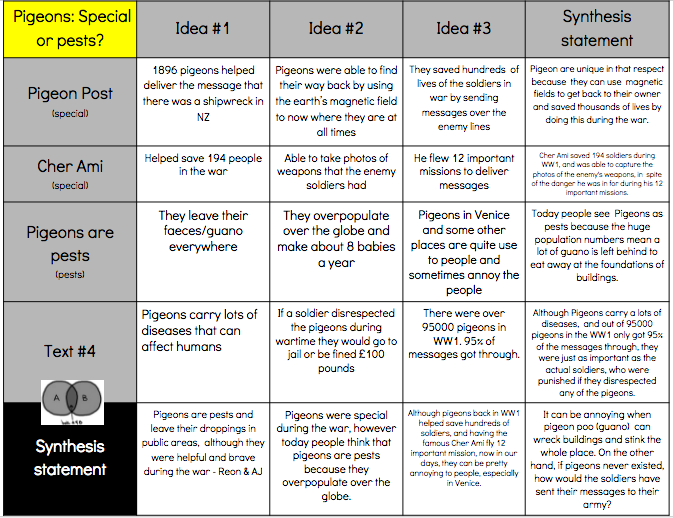
This morning we were revising synthesising to help us make connections between the different texts we have used to find information. To begin Harry reminded us that synthesising happens when we take the knowledge that we already know and add it to the new knowledge we have gained to create a new understanding. Revisiting what synthesising was asking my students to do was vital for making stronger connections to the learning.


The chart below reflects the synthesising from R group. I am so impressed with the connections they made but realised initially the idea of joining ideas together had slipped through the net. Most boxes had two separate ideas that were not linked by a conjunction. To overcome this we spent some time exploring conjunctions. 


Wednesday, 16 November 2016

Learning about Explain Everything with Room 2


Today I used a block of my CRT time to join Room 2 (Year 2/3) as they worked on their Ipads. I am definitely not ashamed to say that a 6 year old taught me how to find, save, lasso, crop and lock an image onto an Explain Everything presentation. I was shown how to find Pixabay, then once there, David showed me how to find an image. We were looking for birds because this is linked to our topic of flight. I learnt how to save the image I want then lasso and crop it. David told me how important it was when I used the lasso I had to try and do a solid line because the ends had to join up. He then showed me how to lock it onto my EE page. Sione showed me how to 'draw the lines' if I wanted to write but Siale told me it was easier to use the keyboard and write my story. Such a privilege to see the learning through their eyes. The image below shows what I learnt from Room 2 today.


I found this to be such a valuable experience as I could see how I could use EE in my class (Year 7/8) to support my learners who find literacy a challenge. Thank you Room 2 for being such great teachers!


David showing me what to do. Step by step with very clear instructions!


Friday, 11 November 2016

Multimodal in LS2!

Last week after a staff meeting on multimodal sites I put my new learning into practise. I had already embraced suggestions made by Aaron from Woolf Fisher, that each of our learners make connections to learning in different ways. My initial planning aligned to included options for a scaffolding text, a complimentary text, a challenge text and a self selected text and was presented on a set of google slides.

Click on the image below to view this


The change to a multimodal page on our site was simplified as I had already created the content. Getting my head around html was a bit of an initial challenge but after blindly 'pushing buttons' and looking at 'help' sites our multimodal page was born. This was extremely well received by my students as they were initially hooked in by the layout. We explored the learning opportunities briefly together, before encouraging them have a closer look in pairs. The best part of this was the room was alive with a high level of excited conversation taking place as they clicked on the links. Normally I wouldn't do this but it was a first and I needed buy in.

Regrouping my students was the next task and how our mixed ability R-E-A-D groups came to be. Surprisingly there were no objections in regards to who was in each group. This highlights the importance of knowing your learners. 


 Our multimodal page - Click here to access the page

The image below reflects the high level of engagement in a reading lesson as my learners worked their way through the challenges on our new multimodal site. 


We have systematically worked our way through each task, discussing and recapping our learning and the comprehension strategies we have been using to make connections to the text. I have discovered that my learners prefer to work collaboratively. The independent task was not as successful as the opportunities for talking about the the learning were fewer. This is definitely something I will take on board. 

Our first task was the question matrix. This was an idea I adapted from my learning at the NZLA 2016 conference. Being able to write their own questions immediately personalised the learning. The idea behind the matrix is that as we answer the questions as we the find information. My intention was to turn this into a 'race', but one group took it upon themselves to begin answering their questions before I had a chance to set this task up!  

We decided to use a group follow up DLO to record our learning as we went along. This proved to be an excellent scaffold/resource that could be referred to as we explored the guided task of synthesising the ideas gained from each text. Sadly I didn't record any of this as it was one of the most powerful lessons I have seen this year. The rich dialogic discussion reflected the strong connections that had been made to the learning.

We used our learning from a earlier session taken by Mairi Ogilvie from the National Library, who reminded us how to narrow a search, to help us find a self selected text. I used one student's DLO on the site as a reference tool for this task.

Our final step is to form our opinions. Watch this space for the DLO's that reflect this and the feedback from my learners!